YouTube Autocomplete: Free Tool to See What People Actually Search on YouTube
Every YouTube video that gets discovered starts with a search. The quickest way to learn the exact words your audience types is to read YouTube's own autocomplete, the list of suggestions that drops down the moment you start typing in the search bar.
This tool pulls those suggestions for any keyword you enter, lets you tick the ones that fit, and copies them to your clipboard in a single click. No account, no setup, no clutter. Paste the phrases into a title, a description, a tag list, or a spreadsheet and keep moving.
What Is YouTube Autocomplete?
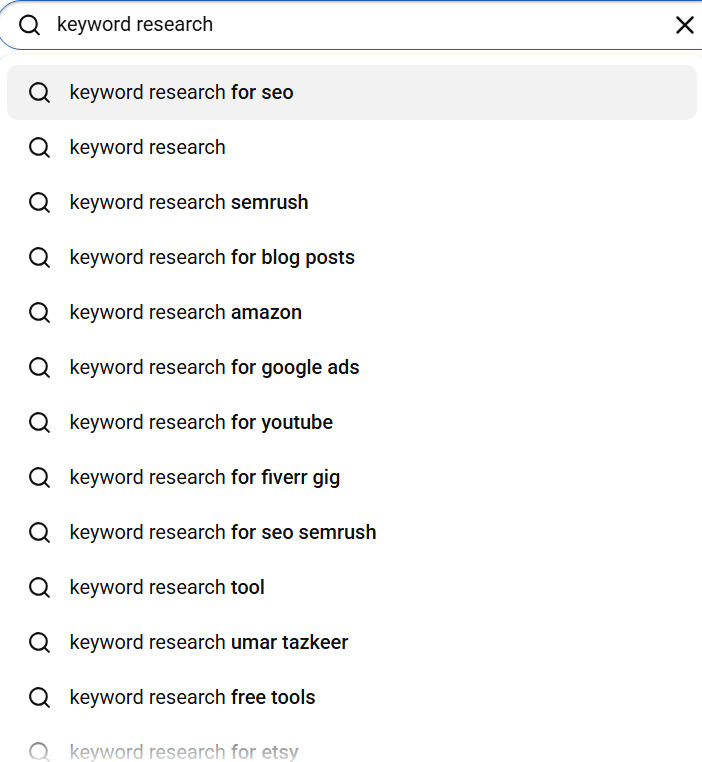
When you begin typing in YouTube's search bar, a dropdown of predicted phrases appears. Those predictions are autocomplete, YouTube's best guess at what you are about to search, built from the combined search history of everyone who came before you.
The key point for keyword research is that these are not guesses about demand. They are evidence of it. YouTube only predicts a phrase once enough people have typed it for the algorithm to learn the pattern. So every suggestion in that list is something real people search, which makes autocomplete fundamentally different from estimated keyword data: it is observed behaviour, not a model.
The catch with reading autocomplete by hand is reach. Typing one keyword into YouTube shows you a handful of suggestions, then you copy them one at a time and lose your place. This tool does the same lookup but hands you a clean, selectable list you can copy in one go.
How the YouTube Autocomplete Tool Works
The whole flow is three moves: type, pick, copy. You enter a seed keyword, the tool reads YouTube's live suggestions for it, and you copy the phrases worth keeping.
- Type your keyword into the search box above. Suggestions load as you type, no button to press and no account needed.
- Read the list. Every phrase is something people search on YouTube right now, pulled straight from the platform.
- Tick the suggestions you want to keep using the checkboxes beside each row.
- Click Copy to clipboard. Every selected phrase is copied at once.
- Paste the phrases into your video title, description, tags, a spreadsheet, or the main keyword research tool to check search volume and CPC.
Want more angles than the first list gives you? Change the seed. Add a word like best or how to, try a more specific phrase, or search a closely related term, and run it again. Each new seed opens a different slice of what people are actually searching for.
Why YouTube Keywords Are Not Google Keywords
People search Google and YouTube in different ways. Google queries are often short fragments such as "video editing software" or "best portrait lens". YouTube queries lean conversational and instruction led: "how to edit videos on iphone for beginners" or "best portrait lens for sony a7 under 200".
The reason is intent. Almost everyone searching YouTube wants to watch something, usually to learn or to be entertained, and that shapes the exact phrasing. A query like "how to cut in premiere pro" barely registers in a web keyword planner, yet it earns thousands of views for tutorial creators because it lives in YouTube's search behaviour, not Google's.
Build a YouTube channel on web keyword data and you end up chasing phrases that belong to a different search engine. Reading YouTube's own suggestions keeps you aligned with how viewers actually look for video.
| Feature | Google keyword tools | YouTube Autocomplete Tool |
|---|---|---|
| Search engine covered | Google Search | YouTube Search |
| Query style | Short web search fragments | Conversational video queries |
| Typical intent | Mixed: read, buy, find | Watch and learn |
| What the data is | Estimated volume | Observed searches |
| Account required | Often yes | No |
Where to Use the Keywords You Copy
A copied list of real search phrases is only useful once it lands in the right place. Here is where each phrase earns its keep.
Video titles
Match a title to an exact autocomplete phrase and it lines up with how YouTube reads intent. A video titled "how to edit videos on iphone for beginners" tends to beat one titled "iphone video editing guide" when the first is a real suggestion and the second is something you invented. Put your main phrase near the start of the title.
Descriptions
Drop your main phrase into the first line or two of the description, the part viewers see before they click more. The opening of a description carries the most weight for search, so lead with the keyword and write naturally around it.
Tags
Use a few close variations of your main phrase as tags, with the primary keyword first. Tags play a smaller role than they once did, but they still help YouTube connect your video to related searches and catch common misspellings.
Volume and CPC check
Autocomplete tells you a phrase is searched, not how often. Paste your shortlist into the main keyword research tool to see exact monthly search volume, CPC, and competition, then film the phrases that combine real demand with a topic you can win.
Seed keyword to a usable shortlist
How to Turn Autocomplete Phrases Into Better Rankings
YouTube reads the title, description, tags, and even the spoken words in your video to decide what it is about and who should see it. The closer those signals match a real search phrase, the stronger the match. A simple checklist:
- Title: lead with the exact phrase and keep the title tight, roughly 50 to 60 characters so it does not get cut off in results.
- Description: place the phrase in the first 25 words, then write a couple of natural sentences around it rather than stuffing it in repeatedly.
- Tags: make your primary keyword the first tag, then add a small set of close variations.
- Spoken words: say the phrase out loud in the video. Captions pick it up, and that text becomes another signal YouTube can read.
One phrase used consistently across all four places sends a far clearer signal than the same phrase scattered loosely, or a different phrase in each spot.
Autocomplete Tool vs Typing Into YouTube by Hand
You can read autocomplete straight from YouTube's search bar. The difference is friction. By hand you see a few suggestions, copy them one at a time, and lose your spot. Here the list comes back ready to select and copy in bulk.
| Step | Typing into YouTube | This tool |
|---|---|---|
| Source of suggestions | YouTube autocomplete | YouTube autocomplete |
| Collecting the phrases | Copy one by one | Select and copy in bulk |
| Keeping your place | Easy to lose track | Full list on one screen |
| Account required | No | No |
| Cost | Free | Free |
All Free Tools on Keyword Intent
Keyword Research Tool
The main research tool returns exact monthly search volume, CPC, competition, and trend charts for any keyword across 200+ countries and 40+ languages, without an account or daily cap. Pair it with this page: find phrases here, then check their numbers there.
Keyword Golden Ratio (KGR)
The KGR Tool flags keywords where the number of competing pages is low relative to search volume. Enter up to 20 keywords and get KGR scores in seconds, the fastest way to find mathematically low competition targets for new channels and sites.
Keyword Grouping
Paste a keyword list into the Grouping Tool and it clusters terms into topic groups for content planning. It pairs well with the phrases you copy here: group your YouTube keywords before you map out a content calendar.
Frequently Asked Questions
What is YouTube autocomplete?
YouTube autocomplete is the list of suggestions YouTube shows as you type in the search bar. Each one is a phrase people have searched often enough for YouTube to predict it, which makes autocomplete one of the most reliable sources of real keyword ideas for video.
How does the YouTube Autocomplete Tool work?
Type a keyword into the search box. The tool reads YouTube's own suggestions for that keyword and lists them. Tick the phrases you want, click Copy to clipboard, and paste them into a title, description, tag list, spreadsheet, or another keyword tool.
Is YouTube autocomplete data good for keyword research?
Yes. Autocomplete reflects what people actually search on YouTube rather than modelled estimates. A phrase only appears once enough people have typed it, so its presence is direct evidence of demand, and the data is live rather than a historical average.
How is this different from Google keyword tools?
Google keyword tools report data for Google Search. YouTube is a separate search engine with its own query patterns, and people search for video differently. This tool reads directly from YouTube's suggestion feed, so every phrase is native to video search.
Can I copy the keywords I find?
Yes. Select the suggestions you want with the checkboxes, then click Copy to clipboard. Every selected phrase is copied at once, ready to paste anywhere.
Is the tool free?
Yes, fully free with no account required. Type a keyword, read the suggestions, select what you want, and copy.
How many suggestions will I get for one keyword?
You get the live suggestions YouTube returns for the exact keyword you type, usually a short, high signal list of the most searched related phrases. To find more angles, change the seed: add a word like best or how to, or try a more specific phrase, and search again.
Where should I use the keywords I copy?
Put your main phrase near the front of the title, repeat it in the first line of the description, and add a few close variations as tags. You can also paste your shortlist into the main Keyword Intent tool to check search volume and CPC before you film.
Start with one keyword above. Read what YouTube already knows people search, keep the phrases that fit, and copy them in a click, so you arrive at your title, description, and tags using the words your audience actually types.